
Bloxkeep guide › Sending to Discord
Sending to Discord
Bloxkeep can post play-time summaries, a live status message and alerts to a Discord channel of yours. It is off until you turn it on.
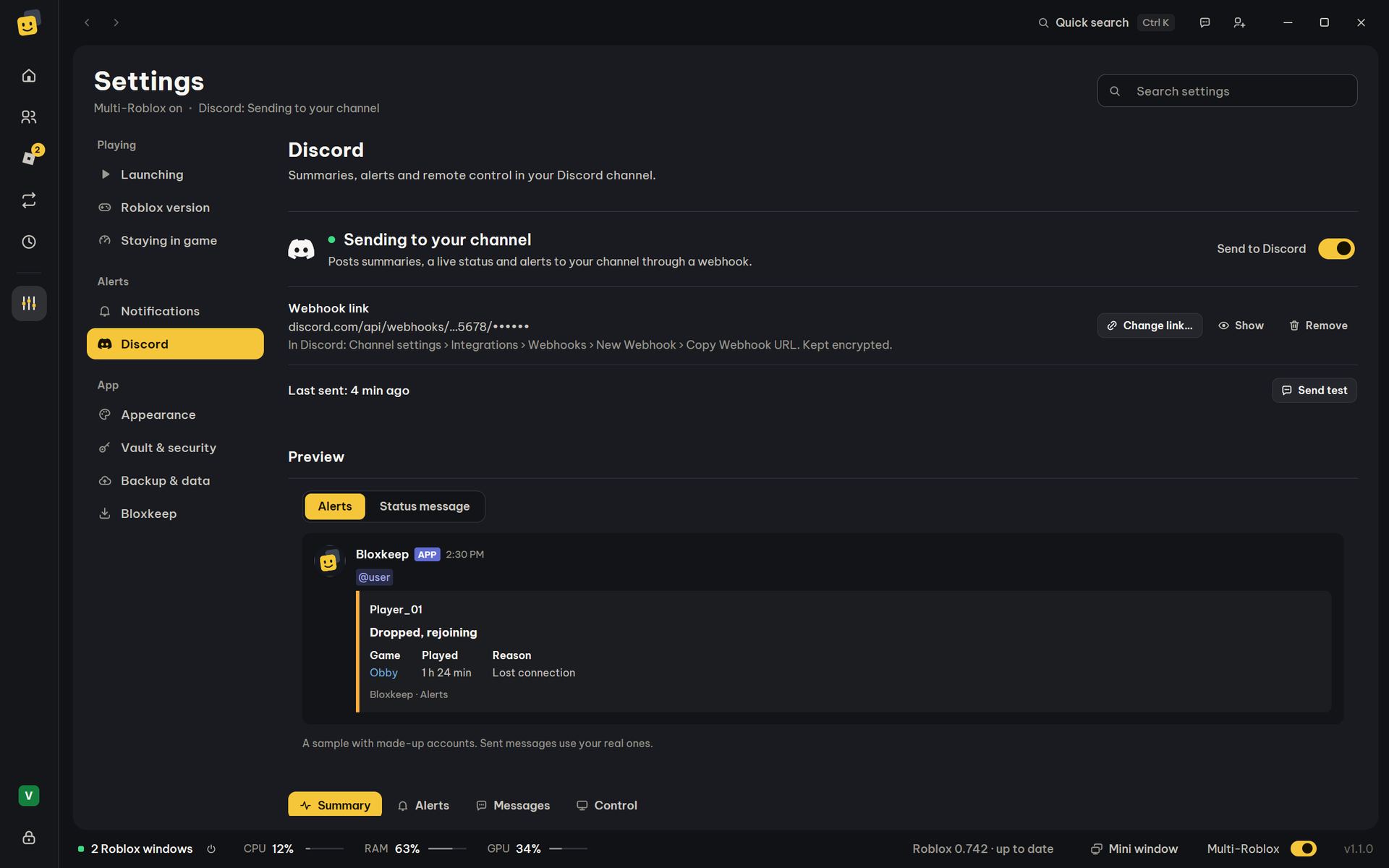
Quick steps
- In Discord: Channel settings › Integrations › Webhooks › New Webhook › Copy Webhook URL.
- In Bloxkeep: Settings › Discord › Paste link…, paste it and press Save. The link looks like
https://discord.com/api/webhooks/…. - Turn on Send to Discord, then press Send test: "Test message sent. Check the channel."
Turning on Send to Discord without a link asks for it.
On your Discord profile
Show on my Discord profile (Settings › Discord, the Control tab) puts "Playing Bloxkeep" on your own Discord profile: how many Roblox windows are open, the game (or how many games), since when, and a Get Bloxkeep button to the website. It never shows an account's name. It works through the Discord app running on this PC, needs no webhook, and is off until you turn it on. Quitting Bloxkeep takes it away.
Control from Discord
Type /pc in Discord to see how your accounts are doing, run a preset, close windows, switch server or see the windows on your PC, from anywhere. It is off until you turn it on.
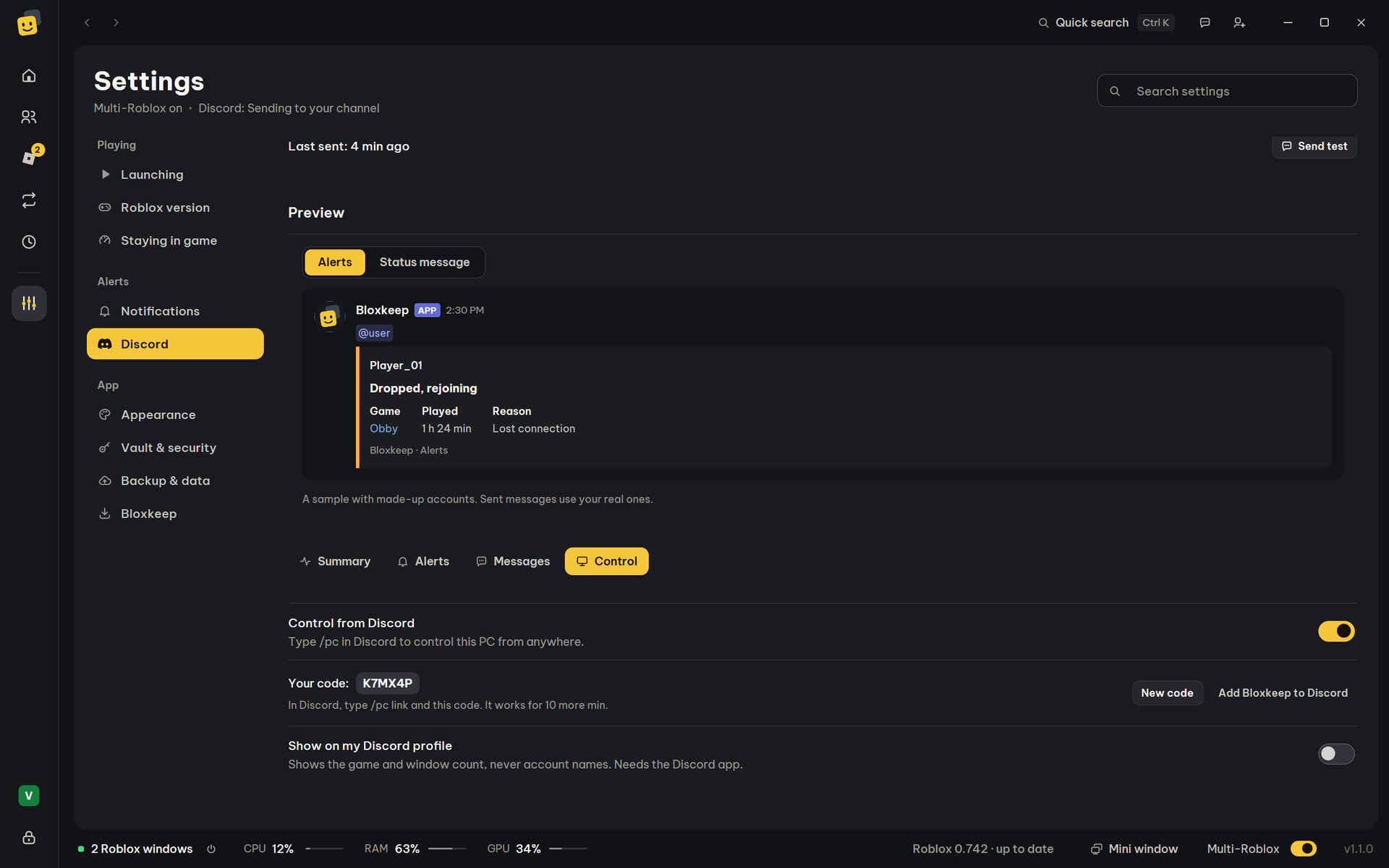
- In Bloxkeep: Settings › Discord, the Control tab, turn on Control from Discord. A six-letter code shows; it works for 10 minutes (New code for another).
- Press Add Bloxkeep to Discord and accept, so
/pcworks in any chat. - In Discord, type
/pc linkand the code. - Bloxkeep asks whether to allow that Discord account: press Allow. Nothing is linked until you do, so a code someone else saw (on a stream, say) is no use to them.
| Command | What it does |
|---|---|
/pc status |
The status card: each account with a Roblox window, its game and how it's doing. |
/pc preset |
Runs a preset (Discord suggests your presets as you type). Once its windows are open, how it went follows. |
/pc close |
Closes one account's Roblox window, or All accounts. |
/pc switch |
Moves an account to another server of its game, or All accounts (those in one game go together). |
/pc screenshot |
A picture of one account's Roblox window, or of All accounts (10 at most). Minimized and hidden windows too: each is shown unseen for half a second, pictured, then put back. |
/pc unlink |
Stops controlling that PC from Discord. |
- The answers are seen only by you.
- Screenshots: one at a time, 15 seconds apart, 4 a minute at most. Each time, Bloxkeep shows a notice on the PC. The pictures go from your PC straight to Discord, not through Bloxkeep's bot.
- While accounts are moving to another server,
/pc switchwaits until they are in. - With more than one PC linked, pick it in the
pcbox. - While Bloxkeep is locked, it only answers that it is locked.
- A preset that would ask something first (Multi-Roblox off, say) isn't run from Discord: Bloxkeep says why.
- Turning Control from Discord off unlinks the PC.
What it does
Bloxkeep posts through a webhook: a link that lets a program post to one channel. Nothing is sent while Bloxkeep is locked.
The three kinds of message
| Kind | What it shows |
|---|---|
| Play time summary | Total play time, time per account, top games, sessions and disconnects. |
| Alerts | Account dropped or auto-rejoin, scheduled presets, sign-in needs renewing (bans too), low RAM, launch problems. Alerts within 10 seconds go out as one message. |
| Status message | One message, edited in place: the accounts open, their game, time playing, PID and RAM. |
| An alert | Several alerts in one message |
|---|---|
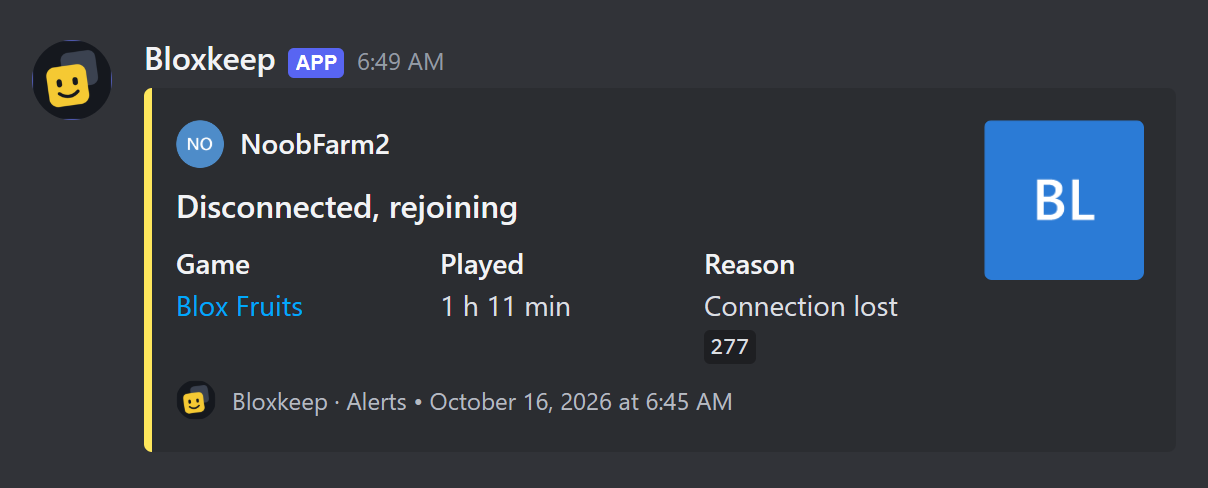 |
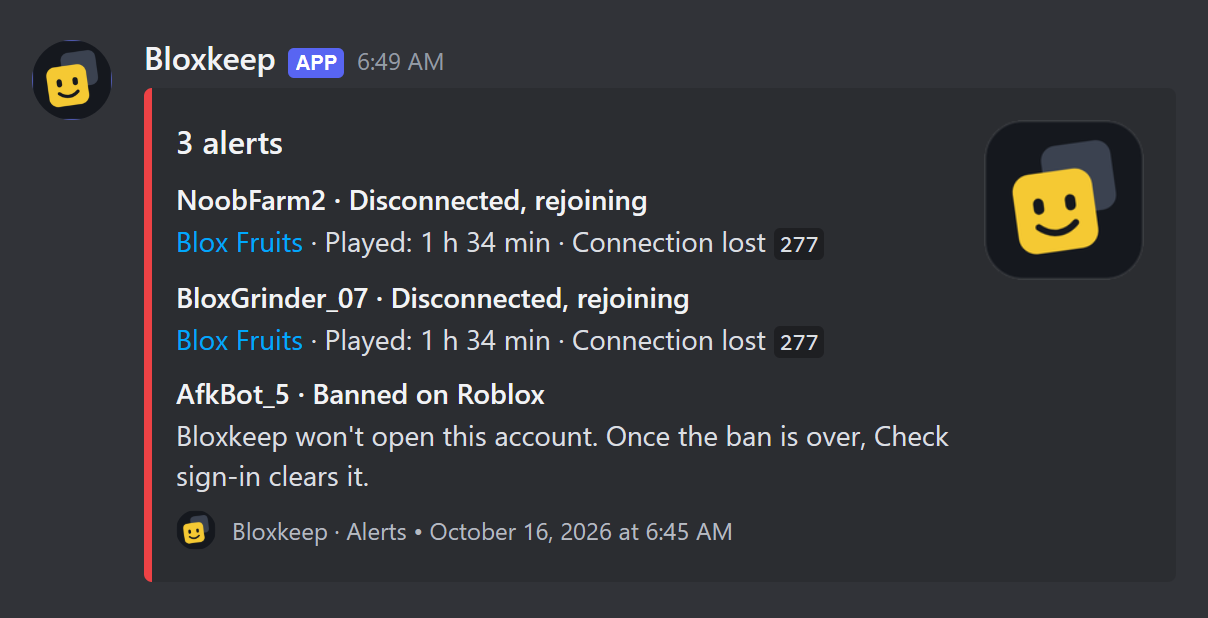 |
| The status message | A play-time summary |
|---|---|
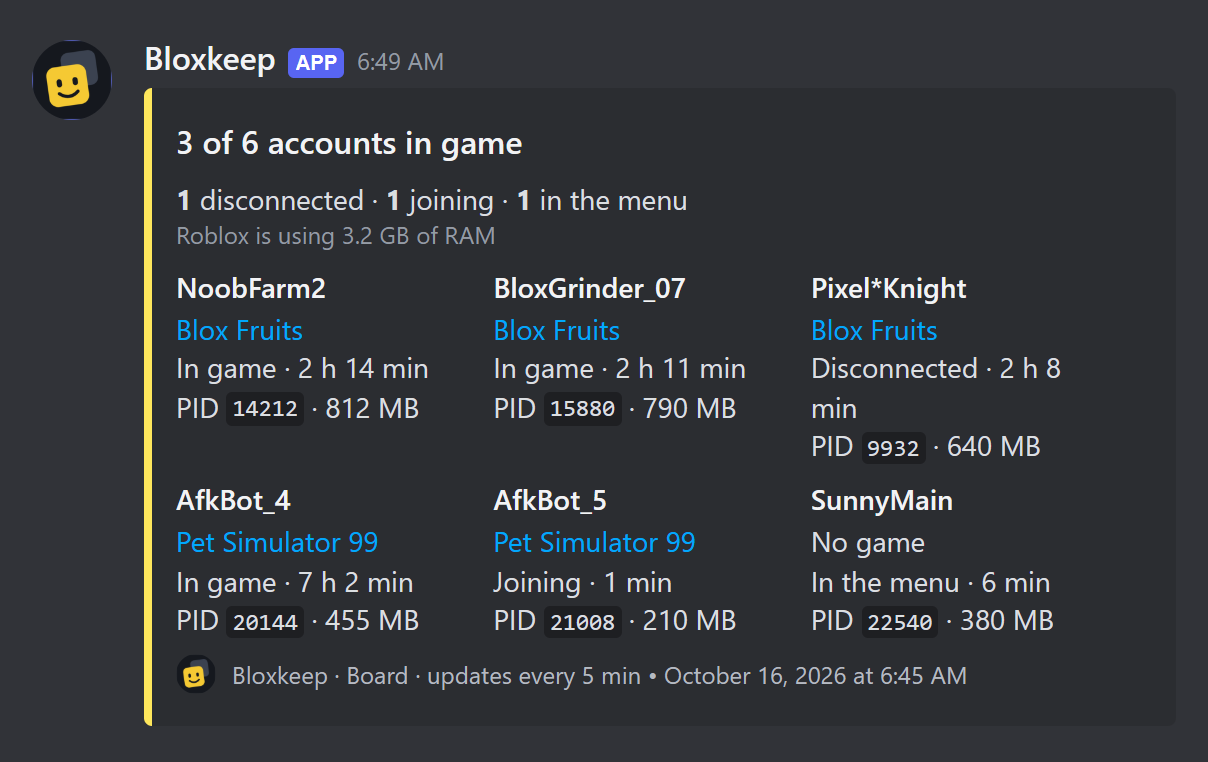 |
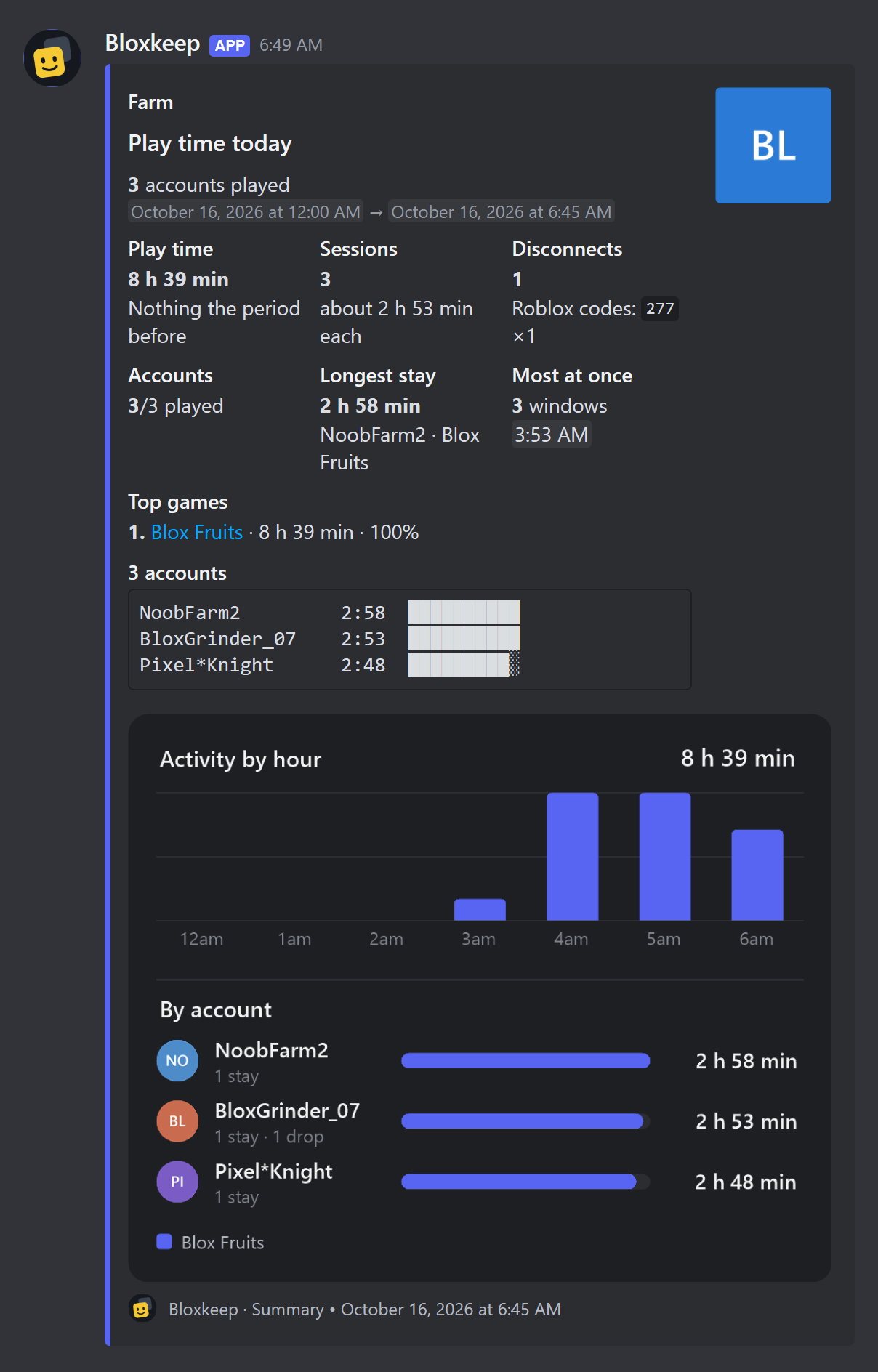 |
Play time summary
Settings › Discord, the Summary tab:
| Row | Choices |
|---|---|
| Send automatically | Never, Every day, Every week, Both. Then Every day at a time, Every week on a day and time. |
| When a scheduled preset finishes | Sent half a minute after its accounts close, counting that preset's accounts only. |
| Covers | Last 24 hours, Last 7 days, Last 30 days. |
| Includes | Total play time, Time per account, Top games, Sessions, Disconnects (at least one). |
| Accounts | All accounts, or Choose… some. |
| Ping | See Pings. |
| Send one now | Send summary sends it now, with the choices above. |
More details
Covers is for the daily summary and Send one now. The weekly summary always covers 7 days; the one after a schedule covers today so far, and goes to the preset's own channel when it has one.
Alerts
- Send alerts turns every kind on or off.
- Ping sets the same ping for every kind ("Varies by alert" when they differ).
- Choose which alerts opens one switch and one ping per kind: Account dropped or auto-rejoin, Scheduled presets, Sign-in needs renewing (bans too), Low RAM, Launch problems.
- They are separate from Windows notifications.
Status message
Keep a status message up to date, with Every 2 / 5 / 10 / 15 / 30 / 60 min. It never pings. When Bloxkeep is locked or closed, it says so.
Pings
Each kind of message can ping Nobody, @here, @everyone, A person… or A role…. A person or a role needs its ID (17 to 20 digits): in Discord turn on Settings › Advanced › Developer Mode, then right-click the person or role › Copy ID.
Quiet hours
Turn on Quiet hours and set From and To: messages still arrive, without pings. If From and To are the same time, quiet hours never apply.
Customise messages
Open Customise messages:
- Sender name: up to 80 characters, without "discord" or "clyde".
- Sender picture: an
https://link; empty uses Bloxkeep's logo. - Language: Same as Bloxkeep, English or Tiếng Việt.
- Message style: Cards (easier to read) or Plain text.
- Hide account names in messages: "Account 1", "Account 2"… instead of names.
Tip
Plain text suits phone notifications.
A webhook for one preset
In a preset, Send this preset's messages to is The channel in Settings or A webhook of its own (paste its link; Send test checks it). The preset's own webhook gets its schedule messages, its summary after a scheduled stop and the alerts about the windows it opened. Everything else goes to the channel in Settings.
If Send to Discord is off, nothing goes out. If Discord deletes the preset's webhook, its messages go to the channel in Settings again.
Managing the link
- Show displays the link for 30 seconds. Replace… pastes another. Remove asks first; messages already in the channel stay.
- The status line says "Last sent: …", "Nothing sent yet", how many messages are waiting, or the last error.
Note
If Discord says the webhook no longer exists (deleted, or its link reset), sending stops, a note says so and the Discord page gets a red dot. Paste a new link.
More details
Messages that couldn't go while you were offline wait. Very old ones are dropped, and the next message says so.
Safety
- The link is kept encrypted with your accounts.
- Messages carry account names (or "Account N"), game names, play time, sessions, PID, RAM and links to Roblox's own pictures.
- They never carry cookies, passwords or the webhook link.
Warning
Anyone who has the webhook link can post in that channel, so keep it to yourself.
Bloxkeep's Discord server
Questions, bugs and ideas go to Bloxkeep's community server: #help, #bug-reports and #ideas, one post each. #roblox-updates tells you when a new Roblox build is coming, when it's live and when Roblox is down; #announcements brings new Bloxkeep versions. Vietnamese chat is in #general-vn. Type /multi to the bot to see whether Multi-Roblox works on the current Roblox and the one coming next.
Nobody from Bloxkeep will ever ask for your cookie, password or 2-step codes.
← User guide · Next: Settings →